
How do I choose whether the Bluerithm agent asks before making changes?
By default, the Bluerithm agent asks before it makes any change to your data. You can let it make changes without asking, one conversation at a time.
Allow or deny a change
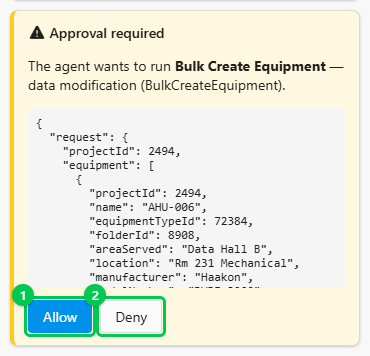
Before a change, the agent shows an Approval required card that names the change and lists exactly what it will write. Click Allow (1) to let it go ahead, or Deny (2) to stop that change. After a denial the agent does not make that change.
The agent does not ask before it:
- reads your data;
- searches the web;
- changes only what you see on screen, such as opening a page or filtering a list;
- opens a form for you to finish, such as a new issue, which you save yourself.
Let the agent make changes without asking
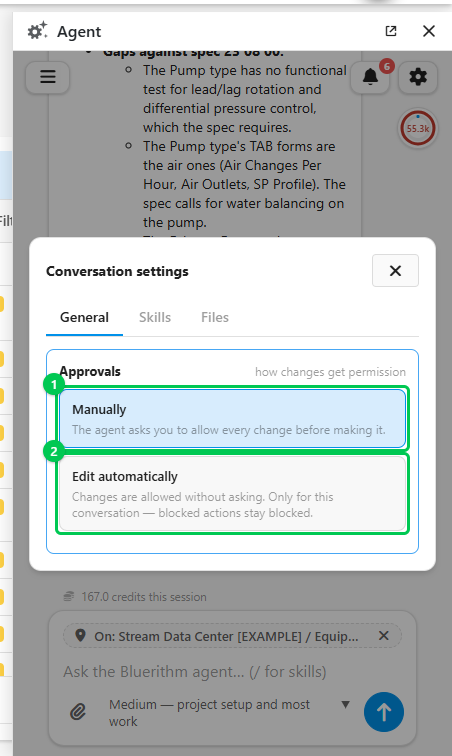
- In the conversation, click the gear (Conversation settings) at the top right of the panel.
- On General, under Approvals, choose Edit automatically (2).
From then on, every change in this conversation goes ahead without a card, including deletions, so use it for work you've already agreed with the agent, such as a project setup after you've checked its plan. The agent still asks its questions. Choose Manually (1) to go back to approving each change. Other conversations are not affected.
Good to know
- Whichever you choose, the agent only has your permissions: it can't change anything you couldn't change yourself.
- If an approval waits more than an hour, the agent pauses. The card stays open; click Allow when you're back and it carries on.