
How does the Bluerithm agent work with the page I'm on?
When you open the Bluerithm agent inside the new Bluerithm (app.bluerithm.com), it knows which page you're on and can act on your screen, so you can say "this list" or "this issue" instead of explaining where you are.
What the agent knows about the page
Above the message box, a chip shows On: and the page you're on. With your message, the agent learns the project, the page, the record you have open (a piece of equipment, an equipment type, an issue or a checklist), the tab, any filter on the list, and the list's columns. It does not see which rows you have selected. To leave the page out of your next message, click ✕ on the chip.
The suggestions change with the page: on an issues list you get suggestions about open and overdue issues, and on a piece of equipment, suggestions about its status, open work and issues.
What it can do on your screen
- Filter, sort and group lists. On the Equipment, Work and Issues lists it can filter, sort, group, search, show columns and select rows.
- Open pages and records, including a list already filtered to what you asked for.
- Start something for you to finish. It can open Bluerithm's own form for a new issue, new work, a project update email, or an email to assignees, filled in. You review it and save or send it yourself.
Because these actions only change what you see, they don't ask for approval. Changes to your data still do (see How do I choose whether the Bluerithm agent asks before making changes?).
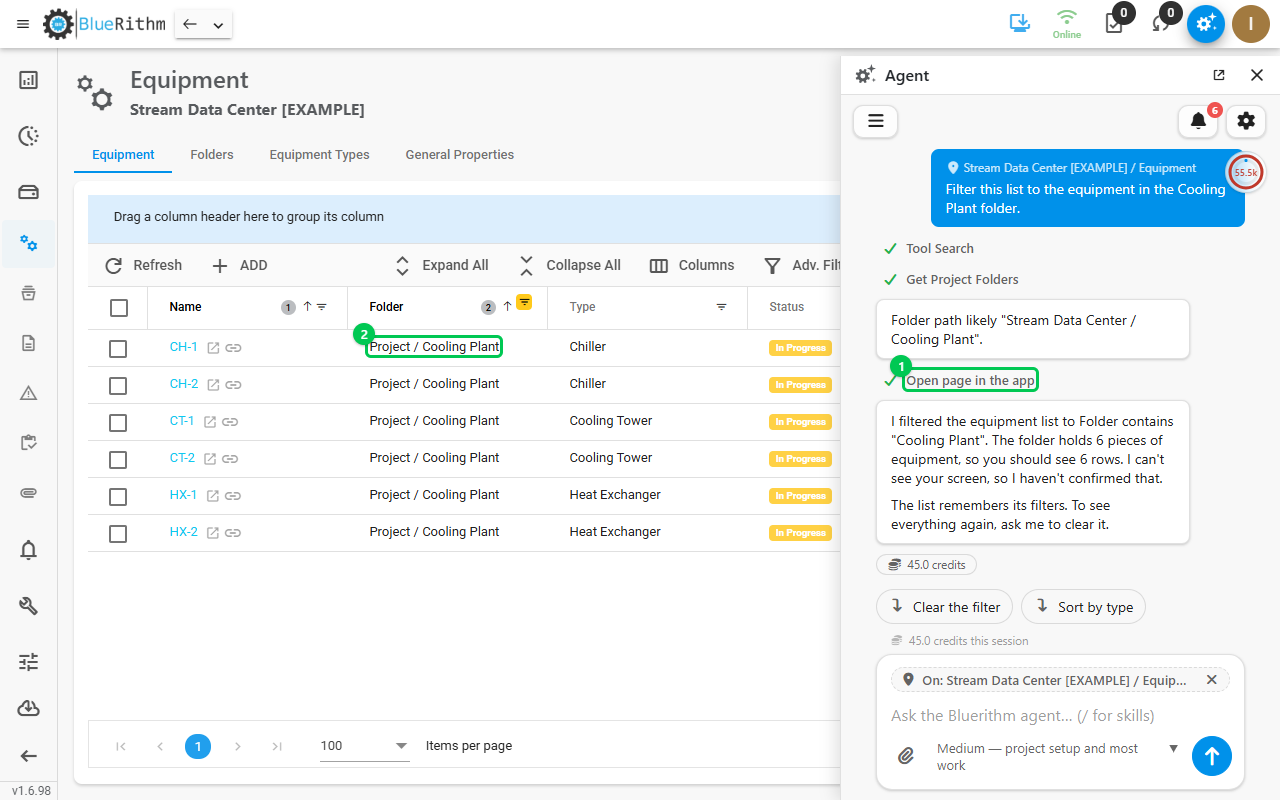
Here, "Filter this list to the equipment in the Cooling Plant folder." made the agent open the list on screen (1), filtered to that folder (2). The list keeps the filter until you clear it, or ask the agent to.
Tips
- To have the list on your screen change, say so: "Filter this list to…". A question like "Which equipment is in the Cooling Plant?" gets an answer in the panel instead.
- In its own browser tab, the agent cannot see your Bluerithm page. Use the panel when your request is about what's on screen.