
How do I make work wait for other work to finish?
On the Workflow tab of a project's Settings you can say which work categories a category can start after, and set its Gate to decide how firmly Bluerithm holds that work back. For example: SAT on AHU-001 can start once FAT is complete on AHU-001.
Your account needs the legacy web app turned off. Work changed in the legacy web app (trac.bluerithm.com) can't be checked against these settings, so Can start after and Gate appear once an Account Admin has turned the legacy web app off for the account (How do I turn off the legacy web app for my account?). Until then the Workflow tab shows a note instead. If our support team turns the legacy web app back on, gates stop holding work back; your settings are kept and apply again once it is turned off.
Set what a category can start after
- Open the project, click Settings in the left menu, then the Workflow tab.
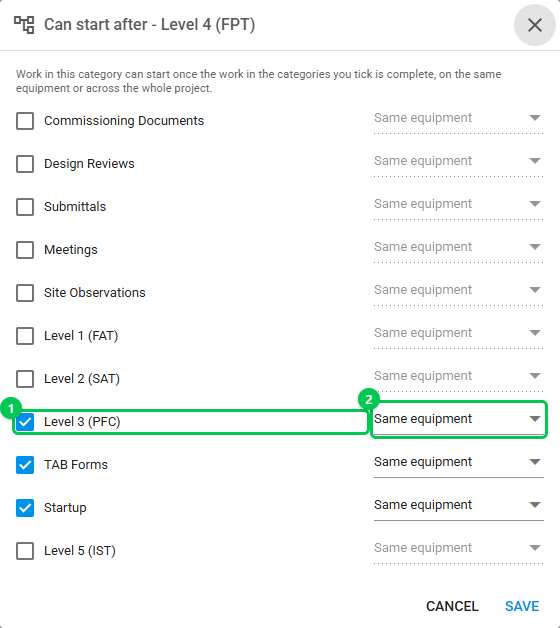
- In the category's row, click the pencil under Can start after (1).
- Tick each category it has to wait for, and choose where that work must be complete (2):
- Same equipment: that category's work on the same piece of equipment. For work at project level, that category's project-level work.
- Whole project: all of that category's work in the project.
- Click SAVE.
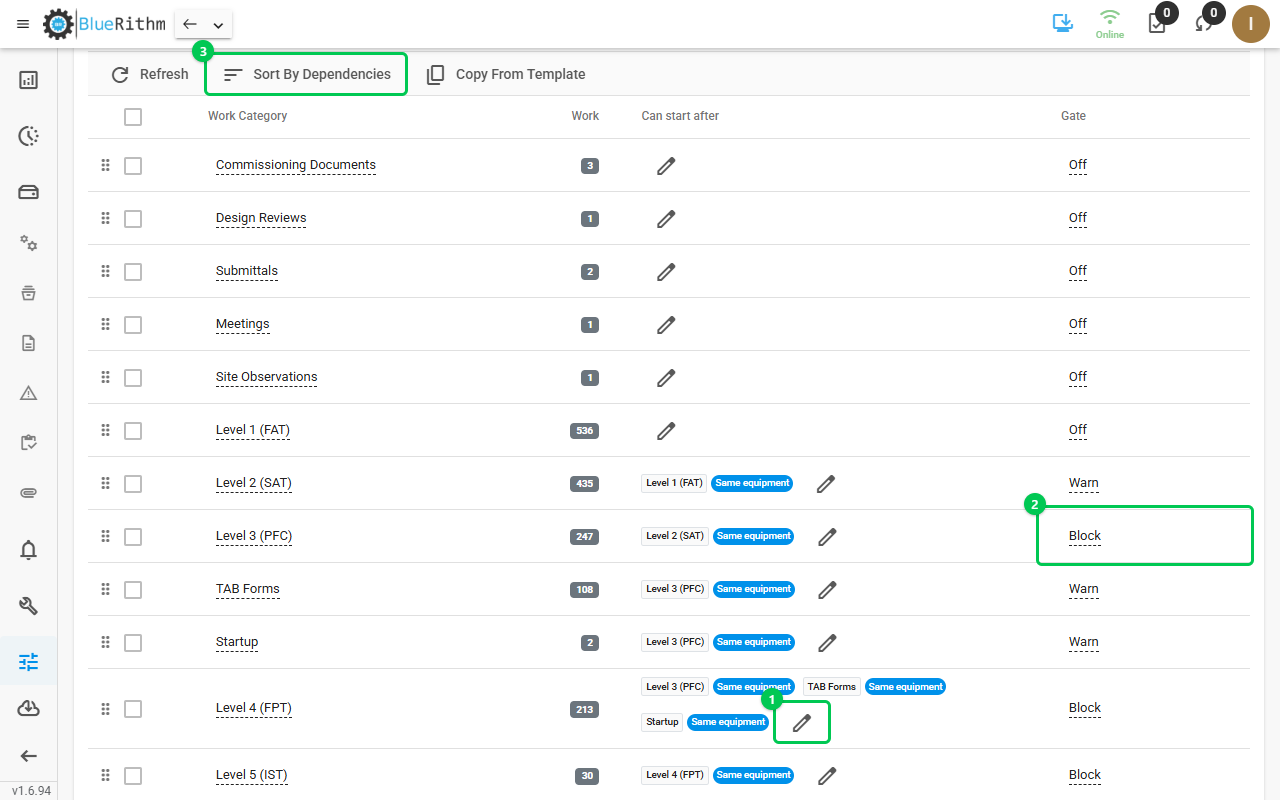
Each entry then shows as two badges: the category, and where it is checked (solid for Same equipment, outlined for Whole project). Bluerithm won't save settings that make categories wait on each other in a circle, and says which ones. Sort By Dependencies moves every category after the ones it waits for and keeps the rest in their order.
Choose a gate
Click the category's gate (Off, Warn or Block) and pick another:
- Off: nothing is held back. What it can start after is kept, and Sort By Dependencies uses it.
- Warn: the work shows what it is waiting for, and Bluerithm asks Start anyway? before anyone starts it. If they go ahead, the work is recorded as started out of order.
- Block: the work can't be started until what it waits for is complete. This holds in the app, in downloaded projects offline, and through the Bluerithm API and MCP server.
What counts as starting work
Starting means changing the work's status from Not Started, ticking or filling in a cell of its table, uploading one of its required files, or creating it with a status other than Not Started. Notes, files, the description, the assignee and the due date can still be changed while the work waits. If there is no work in a category it waits for (for example, no FAT on that equipment), it doesn't wait for it.
Good to know
- Work on project templates and work attached to equipment types is never held back. On a template you can still set Can start after and gates: they are copied into projects with the work order.
- A category that holds meetings can't be set to Warn or Block. Other categories can still wait for it.
- Account Admins and users of the project's owning company can change these settings.
- What people see on waiting work: Why can't I start this work yet?
- Putting the categories in order: How do I set the order work is done in?