
Release Notes
November 1, 2026
- Issues
- In the new Bluerithm (app.bluerithm.com), responding to an issue now can be done in one step: Add Response is the first button on an issue, and one save stores the response, its photos or files, and the Respondent Status. Complete or N/A sends the issue to its owner to verify.
- Responses show as a thread beside the issue, with the status changes between them (who completed, closed or reopened it, and when). The issue's own photos stay in its Files section, which is now open by default.
- Whoever verifies an issue can close it, or reopen it with a comment, from the same reply box. Reopening sets the Respondent Status back to Open as well.
- On a phone, Add Response stays at the bottom of the screen and opens a full-screen form. On the Issues list, Add Note is now Add Response.
- The Respondent Status reads Open, Complete or N/A everywhere.
- How to: Responding to Issues
- Users and companies
- In the new Bluerithm, work, issues, notes and checklist tables a deleted person entered stay and keep their name. Their reports, report schedules and saved filters pass to the Account Admin who deletes them.
- How to: How do I delete people from my account? and How do I delete a company from my account?
- Work
- Excel Edit: work that belongs to the project itself (not to equipment) now downloads in seconds on large projects, and the edited file imports back into the same work.
- Equipment
- In the new Bluerithm (app.bluerithm.com), the Folders tab on the Equipment page now shows the buttons to add, rename, move and delete folders to everyone who can add equipment, including Account Admins on projects owned by another company in your account.
- How to: How do I add a folder to my project?
- Dashboards
- The Project Progress chart on portfolio dashboards now opens sorted by Updated, most recent first.
- Bluerithm agent
- Long tasks no longer stop partway through. The agent's workspace now stays up for as long as a task needs, up to 8 hours, with twice the processing power and memory, so a large project setup or a long review of drawings and specifications finishes in one go.
- If the agent's workspace stops between messages, your next message starts a new one and the agent carries on, instead of answering "did not start in time" for up to an hour.
- Fixes
- In the light theme, links and clickable names (project, equipment, work and issue names, breadcrumbs and Show more links) are now a darker blue that's easier to read, underlined when you point at them.
October 31, 2026
- Projects shared between companies in your account
- In the new Bluerithm (app.bluerithm.com), a User who is a member of a project owned by another company in your account now has the same access as that company's Users: the project's Dashboard, Activity, Project Setup and Settings, and adding and editing equipment, issues, work, notes, files and report sections.
- Moving a project to another company, importing users into it, integrations and deleting the project stay with the project's own company and Account Admins.
- Every User now sees Dashboard and Activity in the project menu.
- That includes deleting records, Edit All and Remove All, restoring from Trash, approving required files, issue settings, equipment types, the work order, checklist tables, dashboards, meetings, project emails, and adding and removing the project's members.
- A User from another company who isn't a member can still view the project; add them to its members to give them this access.
- Files
- AI assistants that can run commands on your computer, such as Claude Cowork and Claude Code, can attach files of up to 1 GB to issues, work, notes, equipment, required files and the project's Files page. The assistant sends the file straight to Bluerithm storage instead of through the conversation. Other assistants keep the 5 MB limit. Claude Cowork needs Bluerithm storage on its list of allowed sites first (Bluerithm + Claude Cowork).
- Copying a project in the new Bluerithm now also copies files larger than 256 MB.
- Equipment
- In the new Bluerithm (app.bluerithm.com), set the order of an equipment type's custom properties by dragging them on the type's Equipment Properties tab. Equipment of that type and reports list the properties in that order, including equipment created before the order was set. A new property is added at the end.
- Equipment created from a type now keeps the type's property order, and copying equipment types or a whole project in the new Bluerithm keeps it too.
- Account Admins and Users can change the order; Guests and Privileged Guests can't. Also available through the Bluerithm API and MCP server.
October 30, 2026
- Work
- New Copy Results on checklists/forms in the new Bluerithm (app.bluerithm.com): fill in a checklist on one equipment, then copy what you entered to the same checklist on the other instances of its equipment type, in one background job. Choose the tables and columns to copy, and whether to fill only empty rows or replace existing entries.
- Account Admins and Users can also copy from an equipment type's own checklist to every instance of the type. Guests and Privileged Guests can copy between the checklists assigned to them.
- It takes over from the legacy web app's form matrix for filling in many pieces of equipment at once.
- How to: How do I fill the same checklist on many pieces of equipment at once?
- Also available through the Bluerithm API and MCP server.
- Fixes
- Notes and descriptions shortened in lists, and the values on the History tab, now show &, < and > as typed instead of codes such as &.
October 27, 2026
- Dashboards
- New Project Progress chart for portfolio dashboards in the new Bluerithm (app.bluerithm.com): one row per active project with its progress, how much of its work is complete, its open, awaiting verification and closed issues, and a small Progress curve and Issue curve. Search and sort the list, and click a project's name to open its dashboard.
- We've added it to the top of each account's main portfolio dashboard, and new accounts' Account Overview dashboards include it. Add it to other portfolio dashboards with + Add Chart.
- The figures are the ones each project's own dashboard shows, and refresh when that project's dashboard recalculates.
- How to: How do I see every project's progress on the portfolio dashboard?
- Also available through the Bluerithm API and MCP server.
October 26, 2026
- Bluerithm agent
- An AI agent is now built into the new Bluerithm (app.bluerithm.com) for accounts with AI tools. Click the Bluerithm agent button in the top bar to open it beside the page you're on, or open it in its own tab.
- Ask it about your projects, have it filter the list on your screen, or give it drawings and specifications and it sets up the project from your own equipment types, checklists and test forms, asking you where it needs a decision.
- It works only with your permissions and asks before each change, unless you let it make changes without asking in that conversation.
- Teach it how you work with skills: describe a task and it writes the skill for you. Account admins review and share skills with everyone, and choose whether guests can use the agent, under Account settings.
- Each response uses AI credits from your account; account admins see usage and buy credits under Account settings.
- How to: What is the Bluerithm agent?, How do I open the Bluerithm agent? and How do I set up a project from my documents with the Bluerithm agent?
- Lists on phones and tablets
- When a list shows cards instead of columns (on a phone, and on most tablets held upright), Filter and Sort buttons now sit beside the search box on Work, Issues, Equipment, Files, Attachments and the other lists in the new Bluerithm (app.bluerithm.com). Filter lists the columns you can filter: tick values, search a long list of them, or type the words a description should contain. The number on the button shows how many filters are on. Sort orders the list by one column, either way.
- On these screens the Saved filters row folds to one line, keeping only the filter you applied, so the list has more room.
- Both work in projects downloaded for offline use.
- How to: How do I filter or sort a list on my phone or tablet?
October 24, 2026
- Work order and gates
- Put a project's or template's work categories in the order the work is done on the new Workflow tab of its Settings page in the new Bluerithm (app.bluerithm.com): drag them into order, add, rename or remove categories, or copy a template's work order. The legacy web app's Work Category Order page has been removed.
- Once your account has the legacy web app turned off, say what each category can start after (on the same equipment or across the whole project) and set its Gate to Off, Warn or Block. Warn asks Start anyway? and records work started out of order; Block holds the work until what it waits for is complete, in the app, offline and through the API.
- Waiting work says on its page what it is waiting for, for example "This can start once Level 3 (PFC) is complete on AHU-001 (3 remaining)."
- How to: How do I set the order work is done in?, How do I make work wait for other work to finish? and Why can't I start this work yet?
- Fully supported by the Bluerithm API and MCP server.
- Project setup from templates
- Project Setup now starts with Add Workflow: pick a template, tick the work categories the project needs and copy them in with their order, what they can start after and their gates. New projects open on this step.
- New Add Dashboards step, after Add Reports: copy dashboards built on a template into the project. The copies show the project's own numbers and sit beside its Project Overview dashboard.
- Project templates have their own Dashboard page for building those dashboards.
- How to: How do I copy a template's work order into a new project? and How do I copy dashboards from a template project?
- Dashboards
- Copy a project or template dashboard into another project of your account, or a template you're a member of, with Copy to Another Project in the dashboard toolbar. The copy shows that project's own numbers; folder filters are left out, since folders belong to one project.
- Company, Assigned To, work status, labels and dates on an Equipment Matrix now count only the matching work, and the matrix lists only the equipment that has it. Set them in the matrix's Filters pane and click Save. People who can only view the dashboard see which work it counts.
- Custom metrics on Card, Pie, Bar, Line, Area and Donut charts can now filter by Label and Equip. Label.
- How to: How do I copy a dashboard to another project? and How do I make an Equipment Matrix count only one company's work?
- Fully supported by the Bluerithm API and MCP server.
- Reports
- Privileged Guests can now use Reports in the new Bluerithm on the projects they're members of: open and preview saved reports, export them to PDF, and run the Excel exports (Issue Log, Task Matrix and COBie), delivered by email. They can't create, edit, copy, delete or schedule reports, and Guests still don't have Reports.
- Every saved report in the Reports list has an Export button, so you can export it to PDF without opening it.
- Email When Ready is now ticked by default under Excel Exports, and the email's download link works for 7 days.
- Fixed: report emails for projects or reports whose name contains an apostrophe.
- How to: How do I export all issues to Excel? and Reports and Exports.
- Images in text
- Paste a screenshot or image straight into work and issue descriptions, notes, table descriptions, meeting text and project update emails in the new Bluerithm, or add one with Insert Image in the editor's toolbar. Images are stored as links, so descriptions stay small and quick to open.
- PNG, JPEG, GIF and WebP images up to 10 MB. Adding an image needs a connection; while offline, attach the photo as a file.
- Downloaded projects can take the images in their text offline: after Make Available Offline, choose to download images when asked "Take images offline too?" (up to 200 MB per device).
- Links and formatting typed when creating issues, work or notes in the new Bluerithm now show correctly in the legacy web app, report PDFs and emails.
- How to: How do I paste a screenshot or image into a description or note?
- My work and My issues
- One click on a project's Work page shows only the work assigned to you: My work, the first badge in the Saved filters row. On the Issues page it is My issues. When your company shares issue and work assignments, it shows what is assigned to anyone at your company. It works in downloaded projects too.
- The Saved filters row no longer hides the grid's horizontal scrollbar.
- Overview: My Work.
- Template projects
- Work created with Quick add on a template now opens on the template's own page, and Quick add on a template no longer offers Meeting.
- Files
- Fixed: the Files page in the new Bluerithm now opens on projects whose files add up to more than 2 GB.
- Messages
- Error and confirmation messages in the new Bluerithm and its report builder use plain wording, without "Oops", "Yikes" or exclamation points.
- API and AI assistants (MCP server)
- Requests made with an API key are limited per account, well above normal use, and are faster. A request over the limit answers 429 Too Many Requests with a Retry-After header. Using Bluerithm itself is never limited. Details: API Documentation.
- A deleted API key stops working at once, and so does a key whose creator is removed from the account or set to Not Active.
- AI assistants connected through the Bluerithm MCP server, such as Claude Cowork, can attach small files (up to 5 MB per request) to issues, work, notes, equipment and the project's files, and add notes with files.
- Creating a project, an issue or an equipment issue through an AI assistant goes more smoothly: the assistant sees which fields are required, and a request missing one names the field.
- Each person's AI assistant calls are limited, well above normal use; an assistant that goes over is told how long to wait before trying again.
September 30, 2026
- History
- See what changed and who changed it on checklists, test forms, issues and equipment in the new Bluerithm (app.bluerithm.com): click History in the page's toolbar, or at the top of an equipment page's first tab.
- Overview: How do I see what changed on a checklist, issue or piece of equipment, and who changed it?
- Fully supported by the Bluerithm API and MCP server.
- Legacy web app
- Account Admins can now turn off the legacy web app (trac.bluerithm.com) for their whole account, so everyone works in the new Bluerithm (app.bluerithm.com): Home, then the Account tab. Only Bluerithm support can turn it back on.
- The legacy web app's sign-in page now recommends the new Bluerithm: Go to the new Bluerithm opens it, and Continue to the legacy Bluerithm shows the sign-in fields.
- How to: How do I turn off the legacy web app for my account?
September 28, 2026
- Following work and issues
- Follow work and issues: click Follow on a work or issue page, or check rows on the Work or Issues page and click Follow or Unfollow.
- Each project has a Following page that lists what you follow and holds your Follow automatically settings: all issues, issues assigned to you, all work, and work assigned to you.
- Updates arrive in the "Updates from your projects" email while Email notifications is on in Settings, and its links now open the item in the new Bluerithm.
- Overview: Follow Subscriptions for Work and Issues.
- Fully supported by the Bluerithm API and MCP server.
September 26, 2026
- Project emails
- Email project members about the work and issues assigned to them: select work or issues on the Work or Issues page, or members on the Members page, and click Send Email. Each person gets one email that lists only their own open items, as a first notice or a reminder.
- Send a project update to chosen members from New > Project update email. Write the update yourself, or start from Draft With AI.
- Turn these emails off or on under Settings > Email notifications.
- Available to account admins and the project's owning company in the new Bluerithm (app.bluerithm.com). Fully supported by the Bluerithm API and MCP server.
- Required files
- Approve, reject or replace required files from the project's Attachments tab, one file or several at once.
- Find uploads waiting for approval with the new Approval column on Attachments.
- An upload that is waiting for approval now moves the work to In Progress.
September 24, 2026
- Dutch
- Bluerithm is now available in Dutch. Choose it under Settings > Language.
- Files for guests
- Guests can add files and file references to the work and issues assigned to them without using the required files feature, and Privileged Guests to any work item or issue, in the new Bluerithm.
- Trash
- The checkbox in the header row selects every item on the page.
September 20, 2026
- Saved filters
- Set up a grid the way you want it, then click Save Filter in the toolbar to keep that view under a name. A saved filter holds the grid's column filters, sort, search, grouping and Adv. Filters selections.
- Available on the Equipment, Work, Issues and Attachments grids of a project, and on the Work grid of a project template.
- Keep a filter to yourself, share it with everyone on the project, or share it with specific project members.
- Overview: Saved Filters.
- Fully supported by the Bluerithm API and MCP server.
August 31, 2026
- Meetings
- Meetings now open on their own page in the new Bluerithm (app.bluerithm.com), instead of the generic work-item page.
- Overview: How do meetings work in Bluerithm?.
- All meeting features are fully supported by the Bluerithm API and MCP server.
July 18, 2026
- Improves offline performance for large project downloads.
July 15, 2026
- Labels and advanced filtering
- Tags have been renamed to Labels throughout the platform, including the legacy web app.
- Labels can now be created, edited, and managed from in the new Bluerithm.
- Labels can be added or removed directly in single-item, multi-item, and Edit All dialogs for work items, issues, and equipment.
- New advanced filters allow filtering work, issues, and equipment lists by labels and for equipment, custom equipment properties.
- Template projects
- Fixed missing create button for template projects.
- Existing projects can be converted to templates (and back to standard projects) from the project edit dialog.
- Dashboards
- Milestone Performance chart: milestone names and category rows now link directly to the Work page with the matching filters applied.
- Offline mode improvements
- Significant performance improvements when working with downloaded projects.
- Pending unsynced changes no longer block network operations.
- Simplified sync states for more predictable syncing behavior.
- Online-only features are now disabled while working in a downloaded project to simplify the experience and protect local data.
- Cowork / Claude plugin
- Added support for Labels in the Bluerithm Claude plugin and MCP tools.
June 2026
- Reports and PDF exports
- Reports can now be created and managed through the API and MCP server, including a new create report endpoint and expanded report section management.
- A reports skill was added to the Claude Cowork plugin.
- Added a report export button on the Work Items and Issues pages.
- Images embedded in work item, issue, and note text are now automatically scaled during PDF export, fixing truncated or failed exports on image-heavy reports.
- Very large report exports are now processed in equipment batches for improved reliability.
- Report export notification emails now include the report file name.
- Copying a report section now includes its filters.
- Improved error handling for report exports, including accurate final job status when a section fails and fallback handling for missing report logos.
- Work items, issues, and equipment
- Equipment status can now be edited directly, with an option to override automatic status calculation.
- The "equipment properties" setting on work items can now be edited in create, update, and bulk update workflows.
- Guest roles can now add notes to work items.
- Work items are always assigned: if no assignee is provided, the item is assigned to the creating user.
- Fixed bugs related to formulas.
- Performance optimizations for bulk create and update operations.
- Offline mode
- Fixed linked issues bug in offline modes.
- Fixed note creation permissions in offline mode.
June 2, 2026
Bluerithm + Claude Cowork Integration
- Updated to version 1.0.31 to leverage improved bulk create and update endpoints for issues, work, and equipment.
May 11, 2026
App
- Performance improvements and optimizations.
- Reports
- The Bluerithm report builder is now available in the app. Reports are now a first-class section in projects and are also included in template projects so they can be rolled forward as needed to every project. Backed by a new standalone reporting microservice for scalable, reliable generation, including improvements to large-report rendering.
- Home page
- A new home page surfacing users and companies across the account for faster navigation and administration. User role is now shown inline on the users data grid.
- AI-assisted user import
- Import users by pasting names, emails, or contact details from a spreadsheet or document — the AI parses and structures the records, eliminating manual data entry.
- Equipment move
- Equipment can be moved between folders directly, without recreating or re-importing.
- Bulk project actions
- Update or delete multiple projects at once from the account view. Projects now expose Company Names for clearer cross-project filtering and reporting.
- PDF viewer improvements
- Updated default markup colors with per-user color persistence across sessions. Finer zoom increments and pinch-to-zoom on touchscreens. Fixed a markup drag bug on iOS.
- Required files
- Fixes and improvements to required-file workflows.
- Template projects
- Reports and Files pages are now included in template projects.
- Excel work item editing
- The Excel work item edit dialog adds an option to exclude IDs when exporting/importing, making it easier to duplicate work items across projects. Also fixes an extra-row bug in Excel-based table edits.
- Job logs
- Improved background job logs and a new jobs endpoint for better visibility into long-running operations like imports, bulk updates, and report generation.
Cowork
- Plugin distribution from Integrations
- The Claude Cowork plugin for Bluerithm can now be downloaded directly from the Integrations page, with hosted plugin distribution for easier installation and updates.
- Faster bulk work item setup
- The plugin now uses high-performance bulk create/update endpoints, dramatically speeding up checklist and test form setup across large projects.
- Project setup orchestration
- Refined orchestration and template-builder skills for more reliable multi-step project setup, including better verification after retries.
April, 2026
App
- New project-level and account-level dashboards
- New project-level and account-level dashboards with a drag-and-drop layout builder and a library of filterable, customizable chart types.
- Portfolio-level dashboards that aggregate data across groups of projects by region, program, client, or any custom grouping.
- Milestone variance charts that show progress and variance across commissioning phases — design reviews, construction checklists, startup, functional testing, and other user-defined activities — in a single view.
- Shareable dashboard links that can be opened by anyone, including project team members, clients, and leadership. Shared dashboards can be embedded in Procore, Autodesk Construction Cloud, or other platforms. Edits made after sharing are reflected automatically.
- New PDF viewer with markup tools and issue linking on drawings
- Issues can now be created or linked directly on floor plans, specifications, schematics, or any PDF opened in Bluerithm.
- Equipment and work items (checklists, test forms, site visit reports) can be linked to specific locations on PDF drawings.
- Users can navigate between drawing pins and the linked issue details, notes, and attachments.
- PDF markup and issue linking is available both online and offline.
- Single sign-on (SSO) support.
- Single sign on support for enterprise identity and access management. Bluerithm customers can use SSO to authenticate to Bluerithm using their Microsoft 365, Google Workspace, etc. identity providers.
- Bluerithm integration for Claude Cowork
- An agentic AI assistant that can read and write Bluerithm project data. The integration understands commissioning domain concepts including equipment types, systems, functional performance tests, and issue tracking, and supports multi-step workflows such as setting up equipment schedules from project documents, creating and configuring checklists and forms across equipment, and managing issues.
- New MCP (Model Context Protocol) server for use with any compatible AI tool.
February 24, 2026
Web App
Release 3.1.0.3922
- Added Equipment Type Category as a new filter option. Projects with equipment types that have categories assigned can now filter work items, issues, and equipment by equipment type category across project views, dashboards, and report builder sections.
- Added date range filters for Due Date, Last Edit Date, and Completed/Closed Date. Users can specify start and end dates to filter results to a specific date range or select rolling ranges (e.g. "Last 14 days").
- Date range filter values on saved filters are now stored in UTC, consistent with how dates are stored elsewhere in the system. Existing saved filters continue to work without changes.
- Fixed a bug where the "Work Top Line" report builder shortcode would show 0 items after editing its filters.
- Updates work metrics calculations for dashboards.
- Improves report builder table of contents formatting.
January 19, 2026
App
Release 1.4.92
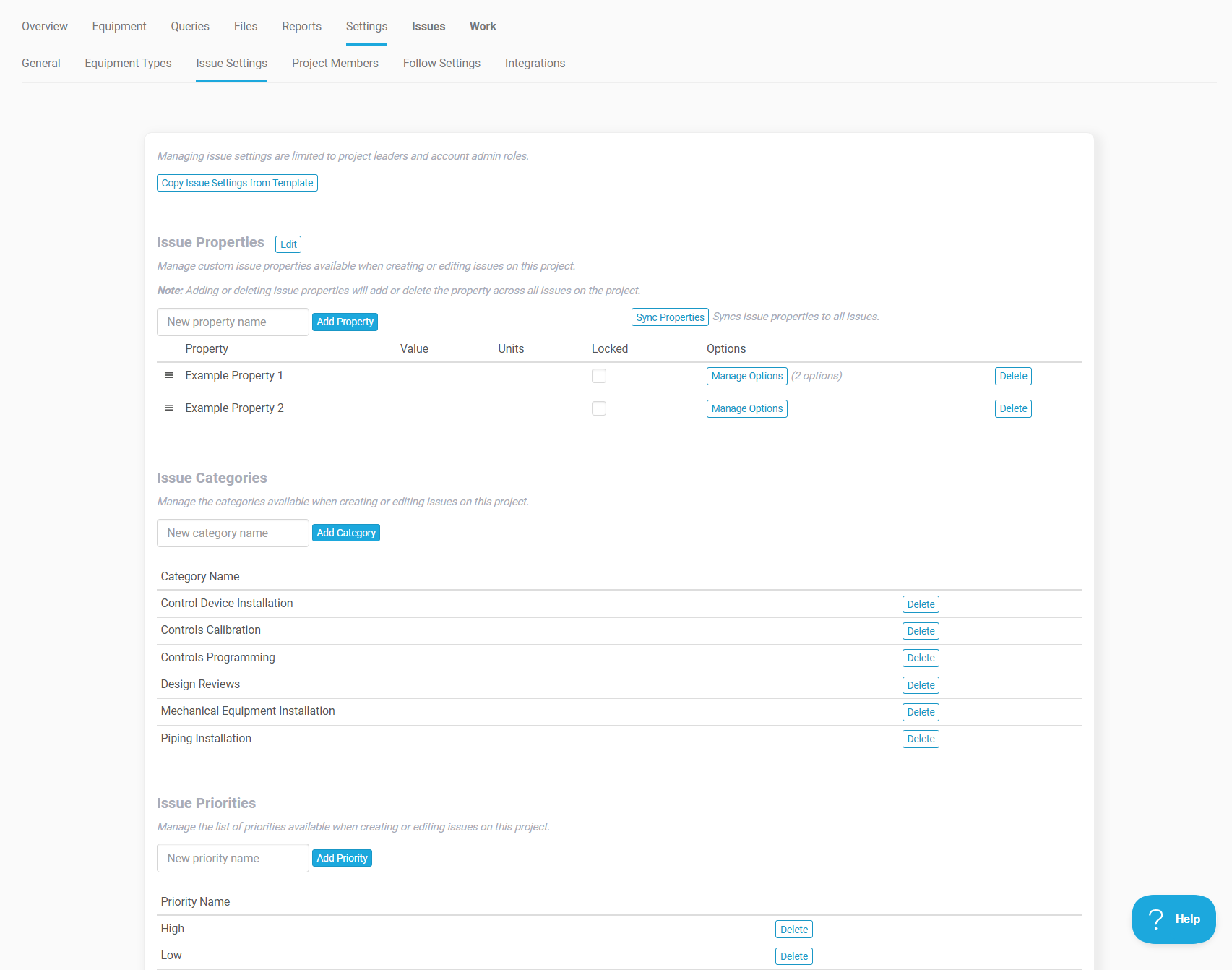
- Adds issue settings to configure fixed issue categories and priorities per project.
- Adds issue settings to template projects, allowing issue configuration to be reused during project setup.
- Adds offline support for issue categories and priorities.
- Moves folders to a dedicated page for improved navigation.
- Various bug fixes and performance improvements.
December 20, 2025
Web App
Release 3.1.0.3725
- Adds report delivery scheduling. Reports can now be automatically generated and delivered to selected recipients on daily, weekly, or monthly intervals.
- Improves report notification emails to include the project name and updated formatting.
- Adds user profile filtering on the project creation page.
- Various bug fixes and performance improvements.
December 10, 2025
Web App
Release 3.1.0.3703
- Adds new report section type called Work Templates from Equipment Types
December 9, 2025
App
Release 1.4.27
- Improves Trash page with larger list size options for easier searching of items to restore.
- Misc. improvements and fixes.
App
Release 1.4.21
- Adds support for managed project lists of issue categories, priorities, and custom issue properties, including defined issue property options.
December 5, 2025
Web App
Release 3.1.0.3681
- Adds support for managed project lists of issue categories, priorities, and custom issue properties, including defined issue property options.
- Adds issue settings management features at Project > Settings > Issue Settings page.
- Adds Issue Settings project setup page for mapping defined issue categories, priorities, and custom issue properties from template projects to projects.
October 14, 2025
App
Release 1.4.3
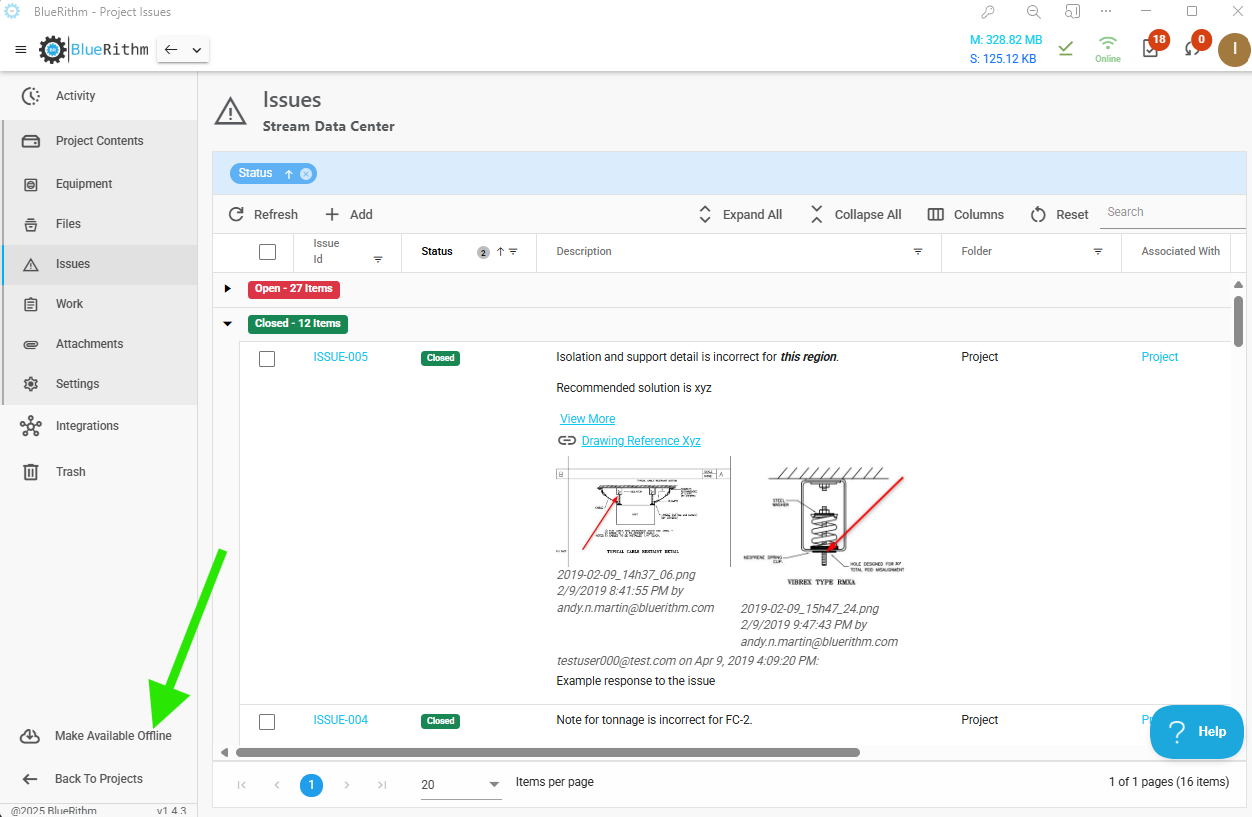
- Adds navigation history for each maneuvering between and within projects.
-
- Adds ability to view and work in projects without downloading to local device storage. Local device storage downloads can still be done when offline access to projects is needed.
-
- Significant performance improvements.
- Various bug fixes and enhancements.

October 14, 2025
Web App
Release 3.1.0.3551
- Updates Procore and ACC integrations for compliance with various Procore and ACC API updates. Bug fixes.
- Adds the Automated Equipment Schedule Import tool.
- Watch a demo video of this new feature.
-


September 17, 2025
Web App
Release 3.1.0.3453
- Updates work timeline chart to use only project start date and the earliest due date to set the first date plot on the chart.

July 30, 2025
Web App
Release 3.1.0.3384
- Increases limit on bulk work operations to 2,000 items.
May 29, 2025
App
Release 1.3.23
- Miscellaneous performance improvements and bug fixes.
- Adds option to set app into a forced offline mode, which prevents automatic project download and sync attempts - helpful in situations where a device's internet connection is unstable.

- Adds Trash page for recovering deleted items.

- Adds Equipment Types and General Equipment Properties pages.

- Adds new integration to Prism from Building Engines.

May 18, 2025
Web App
Release 3.1.0.3259
- Adds restrictions to template project edits. Now, only project members can make edits.
- Only Account Admins can add project members to template projects.
April 21, 2025
App
Release 1.2.84
- Major performance improvements for large forms (i.e. forms with many rows and/or columns).
- Adds a new Activity page that shows recent activity on Issues and Work in a project, ordered by most recent activity by default.

March 28, 2025
API
Release 2.0.219
- The Bluerithm API v2 was released for general use. In addition to enhanced read (GET) endpoints, the v2 API has extensive write (PUT/POST/DELETE) functionality. The ever-growing app functionality is entirely available in the v2 API.
March 17, 2025
Web App
Release 3.1.0.3016
- Major improvements to report builder processing time.
February 25, 2025
App
Release 1.2.37
- Adds a low memory mode and resource use metrics for managing lower-spec devices (e.g. older iPads, etc.).

- Adds new data recovery options to allow recovery of unsynced offline data when devices have problems that prevent data syncs.

- Add an app reload button that helps clear local resources when managing large amounts of unsynced offline data on low-spec devices.

February 24, 2025
Web App
Release 3.1.0.2889
- Follow subscriptions for work and issues can be selected for all work and issues, or all assigned work and issues.

- More filtering options are now available on all My Work projects pages.

January 27, 2025
Web App
Release 3.1.0.2856
- Manual page breaks can now be inserted with this feature in the text editor for report sections.
January 12, 2025
Web App
Release 3.1.0.2836
- Config form uploads now process in a background job and can handle large project updates with each upload.
December 29, 2024
App
Release 1.2.6
- Adds multifactor authentication
- Adds form/table editing. Available online and offline.

- Adds Greek and Arabic language support.
- Adds several updates around general usability, like improved filtering and data handling on equipment, issues, and work pages. Buttons were consolidated and descriptions shortened where possible to reduce clutter.
- Updates and improves Project Files
- Files available for offline use
- Includes both file attachments to issues, notes, forms, etc., as well as general project files.

- Improves navigation for large projects.
- The data selection, loading, and navigation have been improved for simplicity and efficiency when working with large projects (1,000's of equipment), especially in the field on mobile devices.

- Updates form navigation
- Simplified with buttons to navigate Next, Previous, and a quick pop-up to show navigation options for all sections of a form.

December 29, 2024
Web App
Release 3.1.0.2819
- Background job status and history for tracking background jobs like report exports, big COBie imports, big copy operations (forms, projects, etc.) etc.

- Various performance improvements and bug fixes
- Improvements to large COBie file processing, report exports
October 24, 2024
App
Release 1.36
- Performance improvements and bug fixes.
- Adds File Attachments page.
- This page shows all files that are attached to issues, notes, work items, etc.
- The files can be batch selected for offline availability.

October 15, 2024
App
Release 1.28
- Adds equipment property editing.

October 4, 2024
App
Release 1.22
- Adds project file browser.

September 28, 2024
App
Release 1.19
- Adds improved work navigation.

September 24, 2024
App
Release 1.15
- Major performance enhancements.
September 17, 2024
App
Release 1.08
- Adds .pdf viewer and markup tools.

September 6, 2024
App
Release 0.168
- Multi-language native support added.

September 5, 2024
App
Release 0.167
- New Bluerithm app released.
- Replaces existing iOS, Android, and Windows versions of the mobile app.

July 20, 2024
Web App
Release 3.1.0.2596
- Adds ability to copy equipment types with template work on the same project.
- Project and report filters now include template work on equipment types, so report templates can now be set in template projects that only have template work.
- For 'Required File' rejections, adds an option for notifications for the assignee. Also fixes a related bug that prevented the assignee from uploading a revised file after a previous one was rejected.
-

July 2, 2024
Web App
Release 3.1.0.2535
- Improves work generation AI tools. Large bodies of text can now be loaded in a single operation, and the AI tools will generate many work items with tables at once for complete test procedures, checklists, process guides, etc.
-

June 8, 2024
Web App
Release 3.1.0.2512
- Adds 'Project Member List' as a custom report shortcode.
-

June 2, 2024
Web App
Release 3.1.0.2497
- Improves table history load time.
May 15, 2024
Web App
Release 3.1.0.2497
- Updates config form to include template work on equipment types.
May 13, 2024
Web App
Release 3.1.0.2496
- Addresses work table editing bugs.
- Updates certain links on shared dashboards to work more intuitively.
March 20, 2024
Web App
Release 3.1.0.2418
- Work table downloads now include all shortcodes in the Excel file header row. All recent table features like auto-issue-generation on checkbox clicks are included.
- When adding new rows to work tables, all features in the table will now be copied to the new row(s), again including all of the recent table feature updates.
March 2, 2024
Procore Integration
Release 3.1.0.2392 (web app)
- Updates Procore integration to accommodate new Procore API requirements.
February 19, 2024
Web App
Release 3.1.0.2381
- Fixes report builder table of contents preview bug, and other miscellaneous fixes and background improvements.
January 24, 2024
Web App
Release 3.1.0.2323
- Adds dashboard sharing feature to easily save and share filtered project dashboard pages with public links, embed within Procore and Autodesk Construction Cloud, etc.
January 9, 2024
Web App
Release 3.1.0.2299
- Adds customizable report headers and footers.
- Fixes a problem with report logos on copied reports.
- Fixes a problem with shortcodes on copied reports.
December 31, 2023
Mobile App
Release 1.0.21
- Miscellaneous servicing updates including correcting a bug with Complete fields not being set on work items in certain cases.
December 21, 2023
Web App
Release 3.1.0.2161
- Updates metrics calculations on Overview page of projects for better display of work progress.
December 20, 2023
Web App
Release 3.1.0.2159
- Adds auto-issue-generation on a checkbox click in forms.
November 30, 2023
Web App
Release 3.1.0.2076
- Performance improvements.
August 25, 2023
Web App
Release 3.1.0.1862
- Releases user import AI tool.
- Releases Willow Digital Twin integration.
June 21, 2023
Web App
Release 3.1.0.1812
- Releases Bluerithm AI tools.
-


June 21, 2023
Web App
Release 3.1.0.1809
- Releases the Autodesk Construction Cloud + Bluerithm integration.
June 03, 2023
Web App
Release 3.1.0.1799
- Adds 'Design' and 'Proposed' fields to custom equipment properties.
- Adds adjustable ordering to custom equipment properties.


May 21, 2023
Web App
Release 3.1.0.1792
- Adds a folder copy option on the Project > Equipment page.

May 13, 2023
Web App
Release 3.1.0.1787
- Additional performance improvements for loading large projects.
May 1, 2023
Web App
Release 3.1.0.1781
- Performance improvements for metrics and dashboards on large projects.
- Updates to metrics display styling to more obviously show In Progress work.
April 24, 2023
Web App
Release 3.1.0.1779
- Formal change on recommended project-template structure and project setup workflow. You can review the guidance in the updated articles here.
- Updates work metrics to use more intuitive quantity and progress calculations.

April 19, 2023
Web App
Release 3.1.0.1772
- Updates versioning schema.
- Bug fixes for copying work items with required files.
- Adds a Rotate button to images in report section previews.
-

April 13, 2023
Web App
Release 20230414.2
- Updates account selection to include account name instead of just company.
- Initial release of Autodesk Construction Cloud integration.
April 5, 2023
Web App
Release 20230405.2
- Adds account selection for profiles associated with multiple Bluerithm accounts.
- Releases Required Files.
- Other miscellaneous updates.
Mobile App
Release 1.0.20
- Adds account selection for profiles associated with multiple Bluerithm accounts.
- Releases Required Files.
March 24, 2023
Web Portal
Release NA
- Updates Procore integration to retain Bluerithm issue / Procore observation sync references, so if a Procore project connection is removed and re-added, there is no chance of duplicates being created during syncs.
March 10, 2023
Web Portal
Release NA
- Procore integration bug fix where issue/observation continuous syncs were happening only if two-way sync was selected.
March 3, 2023
Web Portal
Release 20230203.1
- Adds options to add & remove universal tags on the work item details page.
February 26, 2023
Web Portal
Release 20230227.1
- Adds report copying to any project.
- Fixes report header logo bug.
February 16, 2023
Web Portal
Release 20230216.2
- Updates report builder to reduce file size of .pdf exports.
February 14, 2023
Web Portal
Release 20230214.1
- Adds a new custom report shortcode option called 'Work Top Line'. This is the simple rollup of all work progress across an entire project.


February 12, 2023
Web Portal
Release 20230212.1
- Adds an automated table of contents within the text editor for document-specific table of contents.
- The standard table of contents for an entire report was not changed.

February 11, 2023
Web Portal
Release 20230211.1
- Fixes links on the project overview page,
- Adds new dynamic links for various work, issues, and equipment statistic cards and charts.

February 7, 2023
Web Portal
Release 20230207.4
- Updates report builder table of contents with right-justified page numbers.
- Improves downloads for very large file sizes.

February 1, 2023
Web Portal
Release 20230201.1
- Better handling of large images pasted into the text editor, in live web app views as well as report exports.
- Adds an Equipment List custom report shortcode section type.

January 25, 2023
Web Portal
Release 20230125.4
- Adds issue parent change option on Issue > Edit page.
- Fixes work matrix colors on the report builder version.
- Miscellaneous bug fixes, performance improvements, and UI updates.
- Adds custom shortcodes to report builder text editor sections.

January 13, 2023
Web Portal
Release 20230114.1
- Fixes spellchecker in text editor.
- Adds a Clear Filters button.
- Updates filter save and load with additional functionality.
- Updates project filters to include custom equipment properties, and custom issue properties.

December 31, 2022
Web Portal
Release 20221230.2
- Adds option to add tags to issues on the issue create page in the web app.
December 30, 2022
Web Portal
Release 20221230.1
- Adds a file rename option.
December 19, 2022
Web Portal
Release 20221219.1
- Adds a project setup wizard page for copying equipment types to projects.
- Equipment types are no longer automatically copied from company-level equipment types and can be selected specifically for a project, and can include any template work attached to the equipment type.
- Batch delete for equipment types.
- Updates project setup wizard pages with clearer navigation links.
December 14, 2022
Web Portal
Release 20221214.1
- Removes restrictions for the User role to delete equipment, work, and issues.
- These items are NOT permanently deleted in the system.
December 12, 2022
Web Portal
Release 20221212.1
- Fixes daily rundown bug that was preventing the emails to send to some users.
December 11, 2022
Web Portal
Release 20221211.4
- Adds shortcodes to report builder text editor for automating project and report-specific data.
December 6, 2022
Web Portal
Release 20221207.3
- Adds QR Code export option to report types.
- Adds URL's to config form downloads for Equipment, Work Items, and Issues.
December 2, 2022
Web Portal
Release 20221202.2
- Updates work matrix on the overview to more intuitively reflect in progress work.
November 30, 2022
Web Portal
Release 20221130.1
- Reorganizes navigation tabs for the Issues and Work sub-pages on projects. The bulk options are now on a tab labeled as such.
-
- Removes restrictions for deleting folders and equipment for the User role when they contained items created by others.
- Adds a files attachment page for viewing all files attached to issues, work, notes, and equipment on projects. Includes download to .zip option.
-
- Other miscellaneous bug fixes and performance improvements.


November 10, 2022
Web Portal
Release 20221111.1
- Adds custom issue properties to projects.
- Corresponding update to mobile apps to follow.
November 7, 2022
Mobile App
Release 1.0.19
November 1, 2022
Mobile App
Release 1.0.18
October 16, 2022
Web Portal
Release 20221016.1
- Adds work templates to equipment types on projects.
October 6, 2022
Web Portal
Release 20221006.3
- Adds Date Complete column on Work > Detailed page.
- Adds additional columns on Issue > Summary and Issue > Detailed pages for better sorting and filtering.
October 5, 2022
Web Portal
Release 20221006.2
- Adds filter saving and sharing options.

September 15, 2022
Web Portal
Release 20220915.1
- Adds cut and insert feature to table / form editor.
August 27, 2022
Web Portal
Release 20220827.1
- Adds All Issues and All Work sub-pages to the My Work page.
- All Issues and All Work pages can display lists of all items assigned to a given user.

August 21, 2022
Web Portal
Release 20220821.3
- Updates config form functionality.
August 8, 2022
Mobile Apps
Release 1.0.17
- Bug fix related to adding issues from work item pages.
July 29, 2022
Mobile Apps
Release 1.0.16
- Adds a settings page with options for pop up notifications and sync behavior.
- Bug fixes.
July 20, 2022
Web Portal
Release 20220720.2
- Adds option to skip empty report sections in the report builder. This is helpful when using report configuration templates with many sections, where it's preferred to entirely skip sections when there isn't any content in them based on applied filters.

July 19, 2022
Web Portal
Release 20220719.1
- Bug fix related to form matrices in reports
July 15, 2022
Web Portal
Release 20220715.1
- Changes bulk equipment status change on Project > Equipment page to allow manually override of automatic equipment statuses.
July 14, 2022
Web Portal
Release 20220714.1
- Adds x-axis timeline selection for work summary cumulative chart in report builder (was previously only on Project/Overview page).
July 12, 2022
Web Portal
Release 20220712.3
- Improves work category reordering.
- Updates Project > Settings page.
July 11, 2022
Web Portal
Release 20220712.2
- Adds automatic filter copying from live view filters to report export filters.
- Adds a PDF quick export button on the Equipment page.


July 6, 2022
Web Portal
- Adds x-axis timeline selection for work summary cumulative chart.
-

-


June 29, 2022
Web Portal
- Performance improvements on Project/Overview and Project/Work/Summary pages.
June 23, 2022
Mobile Apps
Release 1.0.15
- Bug fixes related to file syncing.
June 4, 2022
Web Portal
Release 20220605.1
- Reorganizes files page in projects for filtering and sorting.
- Adds bulk download to zip in on files page.
- Adds multi-factor authentication.
- Adds form validation rules.
- Adds support for images in all text editor windows. Copy-paste and insert are supported.
- Adds a text editor report section type.
Mobile Apps
Release 1.0.14
- Adds multi-factor authentication.
- Adds form validation rules.
- Adds support for images in all text editor windows.
April 18, 2022
Web Portal
Release 20220418.3
- Updates to improve COBie imports.
- Updates to equipment type editing features.
April 15, 2022
Web Portal
Release 20220415.3
- Updates issue sorting in reports to handle issue identifiers with different length numbers.
April 14, 2022
Web Portal
Release 20220414.1
- Updates how Last Edit on issues is recorded and displayed on the main Summary and Detailed pages in projects.
April 8, 2022
Web Portal
Release 20220408.1
- Adds COBie tools. https://knowledge-base.bluerithm.com/article/64-cobie-tools
April 1, 2022
Web Portal
Release 20220401.1
- Adds autosave every 3 seconds after typing ends for table edit mode.
March 20, 2022
Web Portal
Release 202203.18.1 (corresponding mobile release coming soon)
- Adds option to embed equipment properties viewing and editing within any work item attached to equipment.
- Updated KB articles:

March 8, 2022
Web Portal
Release 202203.08.4
- Adds a date-range filter for project and report filters. The date range filter works with work item and issue due dates.
- Adds bulk due-date edit option for work items.
- Adds bulk editing options to schedule tool on Project/Overview page as well as main Dashboard.

February 26, 2022
Web Portal
Release 20220226.1
- The main project list page now loads without project metrics by default, which allows the page to load around 40 times faster.
- Project metrics are still available by refreshing the page with the option for metrics selected:

February 24, 2022
Web Portal
Release 20220224.3
- Updates styling on statuses.
- Adds locks on editing closed projects.
Release 20220224.5
- Fixes a bug on the My Work page related to assigned equipment.
- Improves loading speed of My Work page.
February 8, 2022
Web Portal
Release 20220208.1
- Adds an option to the report builder to hide status details on equipment and work items.

February 4, 2022
Web Portal
Release 20220204.1
- Consolidates navigation link for main projects page into one link in main menu bar.
- Adds filters to main projects page.
February 1, 2022
Web Portal
Release 20220201.2
- Updates main dashboard page to default to 3 recent projects instead of all active projects.
January 15, 2022
Mobile Apps
Release 1.0.13
- Fixes a bug with the issue description input field.
January 13, 2022
Web Portal
Release 20220113.2
- Updated page layouts, improved UX, light-mode.
- Procore integration fully released .
- Full text editor for work item, table description, issue, and note text.
- Form summary/matrix builder.
- Issue draft status.
- Daily rundown turned back on.
- Guest users can edit daily rundown settings.
- Copy report sections within report builder.
Mobile Apps
Release 1.0.12
- Updates to support the text formatting features in the web portal.
- Performance improvements.
- Bug fixes.
Web Portal
Release 20211229.2
- Deprecates the 'Import Template Equipment' option on the Equipment page.
- The Setup Wizard is the preferred and more efficient way to add equipment and work to projects.
November 15, 2021
Web Portal
Release 20211116.2
- Fixes a bug related to file dates in reports.
- Fixes a bug related to the Save and Update button on table edit dialog.
November 12, 2021
Web Portal
Release 20211113.2
- Fixes a bug related to attachment links in reports.
November 11, 2021
Web Portal
Release 20211110.1
- Adds buttons to view complete audit history of work items and tables on work items.
NOTE: It's possible that some older entries in tables may not have usernames associated with the updates.

November 6, 2021
Web Portal
Release 20211107.2
- Changes formatting of numbers in tables and reports. Now only calculated numbers from formulas will be automatically rounded and formatted with commas.
NOTE: The corresponding update for the mobile app will be released at a later date. Until this release, the app will still show commas in numbers, but it will not save those commas on the table.
November 1, 2021
Web Portal
Release 20211101.1
- Changes links on pages with filters. Links no longer automatically open a new browser tab, and there is an additional, new link for when a new browser tab is desired to retain current filtered lists.

October 28, 2021
Web Portal
Release 20211028.1
- Moves buttons for New Work from Equipment page to Work page.
- Other bug fixes and background improvements.
October 25, 2021
Web Portal
Release 20211026.4
- Adds work types 'Quality Assurance and Control' and 'Building Envelope'.
- Updates layout and navigation for equipment and subitem pages.
- Minor bug fixes.
October 14, 2021
Web Portal
Release 20211015.1
- Updates issue details page for improved navigation and reduced scrolling.
- Updates work item details page for improved navigation and reduced scrolling.
- Improves the performance of the batch process for table column locking on the Work > Detailed page.

October 9, 2021
Web Portal
Release 20211010.2
- Updates header text in some report section types. Now the project name will be used in place of a generic descriptor.
- Adds a bulk feature for work items that locks specified table columns on selected work items.
- Other miscellaneous background fixes and improvements.
September 22, 2021
Web Portal
Release 20210922.4
- Adds locked cell feature for locking rows, columns, or individual cells in checklists & forms (tables).
Mobile Apps
Windows, Android, iOS
Release 1.0.11 (download here: https://bluerithm.com/#apps)
- Adds support for locked table cells in in checklists & forms (tables).
September 17, 2021
Web Portal
Release 20210917.1
- Fixed bug with file deleting.
- Added buttons to run report exports from work and issues pages in projects.
- Added new company, user, and project types.
- Improved button layout on main work and issues pages in projects.
- Added table column conversion bulk utility back to web portal.
- Fixed bug with deleting linked issues from work details.
September 10, 2021
Mobile Apps
Windows, Android, iOS
Release 1.0.10 (download here: https://bluerithm.com/#apps)
- Updated background processes and miscellaneous bug fixes.
Web Portal
Release 20210911.1
- Added options to cause page breaks after work items and issues.
September 9, 2021
Mobile Apps
Windows, Android, iOS
Release 1.0.9 (download here: https://bluerithm.com/#apps)
- Added buttons on main Work and Issues pages to allow easier reloading and new folder selections
August 31, 2021
Mobile Apps
Windows, Android, iOS
Release 1.0.8 (download here: https://bluerithm.com/#apps)
- Added partial-project downloads to accommodate large and mega-projects.
- Improved resiliency of offline syncing.
- Miscellaneous bug fixes and improvements.
August 27, 2021
Web Portal
Release 20210827.1
- Added a button that collapses work sections on right hand side of page, which allows full-screen viewing of checklists/forms/work items.

Full screen:

August 26, 2021
Web Portal
Release 20210826.1
- Added a feature that allows copying folders on the Equipment page of a project.

August 15, 2021
Web Portal
Release 20210815.1
- Added an option for report builder sections to make all pages have landscape orientation.
- Miscellaneous background performance improvements and bug fixes.

July 31, 2021
Web Portal
Release 20210801.1
-
Added an option to use a "condensed" version of the issue log. The condensed version is the same as the previous standard issue log without pictures or file attachments.


July 30, 2021
Web Portal
Release 20210731.1
- Updated My Work page for easier navigation.
- Added free pricing tier.
- Renamed 'Systems' to 'Equipment'.
- Background performance improvements.
Previous Releases
[documented elsewhere]